
Free Tambola Number Caller App: How to Call Housie Numbers 1–90 (with Screenshots)
Read this guide in: English
Hosting Tambola (Housie) at a kitty party, birthday, Diwali get-together or office event? You no longer need a bag of numbered coins or paper chits. The free Tambola Number Caller from TambolaTickets.com picks the numbers 1 to 90 at random, says each one aloud in your language and shows every called number on a big board – on your phone, laptop or TV.
It costs nothing, shows no ads, weighs less than 100 KB and keeps working without internet after the first visit. Here is how to use it, step by step, with screenshots.
Open the free Tambola Number Caller
Why use a number caller app?
- Truly random: every number from 1 to 90 comes exactly once, in a fair random order. No chits lost under the sofa, no number called twice.
- The host can play too: in Automatic mode the app calls the numbers by itself, so the host is free to mark their own ticket.
- Easy checking: the board shows every called number, so a claim for Full House can be checked in seconds.
- Everyone hears it: the voice calls each number clearly, in 31 languages including Hindi, Marathi, Gujarati, Bengali, Tamil, Telugu, Kannada, Malayalam, Punjabi and Urdu.
Step 1: Open the caller and sign up once
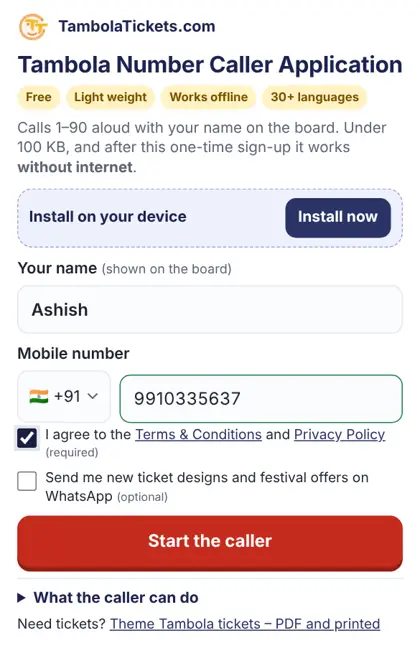
Open tambolatickets.com/tambola-caller/ on your phone. There is nothing to download from an app store. Enter your name (it appears on the board, for example “Ashish’s Tambola”) and your mobile number, tick the Terms box and tap Start the caller.
Tap Install to add the caller to your home screen. It then opens like any other app and works even in airplane mode – handy at venues with poor network.
Step 2: Choose how the numbers are called
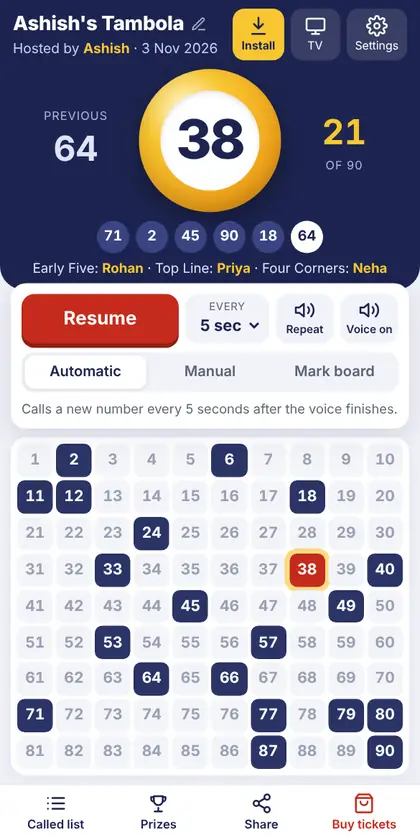
Pick one of three modes at the top of the controls:
- Automatic – the app calls a new number every 3, 4, 5, 7 or 10 seconds after the voice finishes. A countdown shows when the next number is coming. Tap Pause whenever someone shouts a claim.
- Manual – tap Next number for each call. Best when you like to add your own commentary or rhymes.
- Mark board – drawing numbers yourself from a box? Simply tap each number on the board to mark it, and the app keeps the record for you.
The big yellow ball shows the latest number, with the previous number on the left and the count (for example 21 of 90) on the right. The strip below lists the last few numbers, newest on the right. Repeat says the current number again, and the speaker button turns the voice on or off.
Step 3: Pick your language and voice
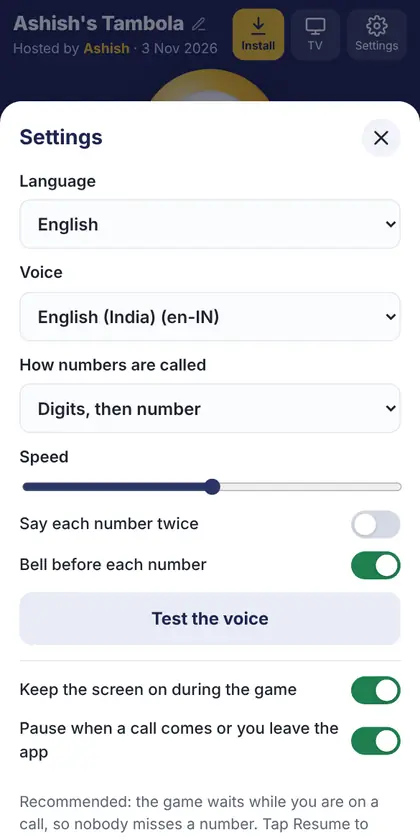
Open Settings and choose from 31 languages. The whole screen switches to that language – buttons, prizes and even the digits on the board (for example १ २ ३ in Hindi). You can also choose:
- How numbers are called: “digits, then the number” (“four, five – forty-five”) or just the number. In English you can also turn on the classic Tambola calls.
- Speed of the voice, a bell before each number, and say every number twice for big halls.
- Keep the screen on during the game and pause on incoming calls, so nobody misses a number while you answer the phone.
The voice comes from your phone’s own speech engine. If your language has no voice yet, install it in your phone’s text-to-speech settings (on Android: Google Speech Services) and press Test the voice.
Step 4: Show the board on a TV or big screen
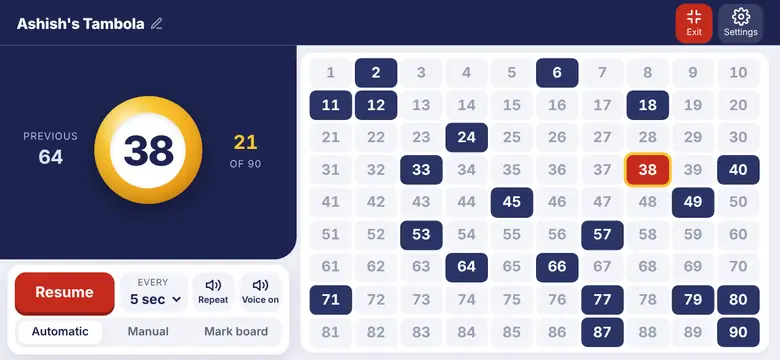
Tap TV at the top. You get three choices:
- Cast to TV – send the board to a Chromecast or smart TV on the same Wi-Fi.
- Big screen on this phone – turns the phone sideways and fills the screen with the board. Perfect for a tablet on a stand. Tap Exit to go back.
- Open TV screen in a new window – on a laptop connected to a projector or TV by HDMI, drag this window to the big screen and keep calling from the laptop.
Step 5: Track the prizes and winners
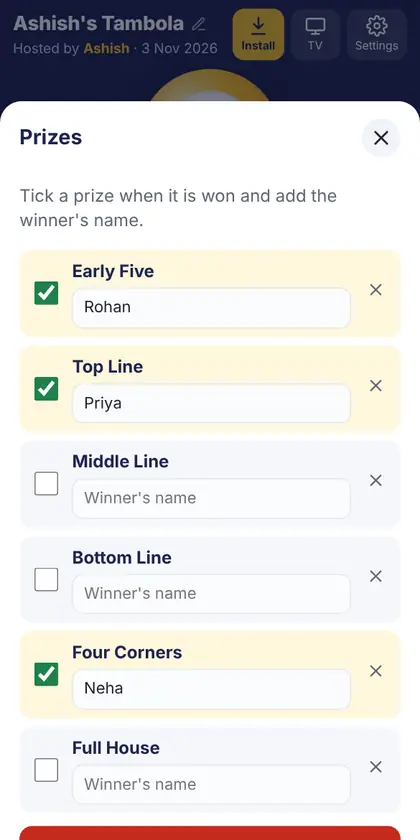
Tap Prizes at the bottom. The usual dividends are ready – Early Five, Top Line, Middle Line, Bottom Line, Four Corners, Full House and Second Full House – and you can add your own or remove any you do not play. Tick a prize when it is won and type the winner’s name; the winners appear under the ball for everyone to see.
Step 6: Share the winners on WhatsApp or Instagram Status

When the game ends, tap Share to WhatsApp / Instagram Status. The app makes a colourful winners card with the game name, date and every winner, ready to post. You can also send the winners list as a WhatsApp message, or share the list of called numbers.
More handy features
- Works offline: after the first visit, the caller runs without internet.
- Game is saved on your phone: close the app by mistake and your game is still there when you open it again.
- Notification controls: while a game runs you can play, pause or call the next number from your phone’s notification bar.
- Start a new game any time from Settings – the board clears and the prizes reset.
Tips for a great Tambola game
- Agree on the prizes and the claim rules before the first number. A wrong claim (a “boogie”) usually means that ticket is out for that prize.
- For a group of 20–30 players, 5 seconds per number in Automatic mode keeps the game lively without rushing anyone.
- Use theme tickets for your occasion – birthday, wedding, Diwali, kitty party and more. Our Downloadable (PDF) Tambola tickets arrive by email within minutes, with unique numbers on every ticket.
- New to the game? Read how to play Tambola.
Frequently asked questions
Is the Tambola Number Caller free?
Yes. It is completely free, with no ads and no in-app purchases.
Do I need to download an app?
No. It runs in your browser at tambolatickets.com/tambola-caller/. You can add it to your home screen with one tap so it opens like an app.
Does it work without internet?
Yes. After the first visit, the caller, the voice and the board all work offline.
Which languages does it speak?
31 languages: English, Hindi, Marathi, Gujarati, Bengali, Tamil, Telugu, Kannada, Malayalam, Punjabi, Urdu, Nepali, Spanish, French, German, Portuguese, Italian, Dutch, Polish, Russian, Turkish, Arabic, Swahili, Chinese, Japanese, Korean, Thai, Vietnamese, Indonesian, Malay and Filipino.
Can I use it on a laptop or TV?
Yes. It works on any phone, tablet or computer, and you can cast the board to a TV or show it on a projector.